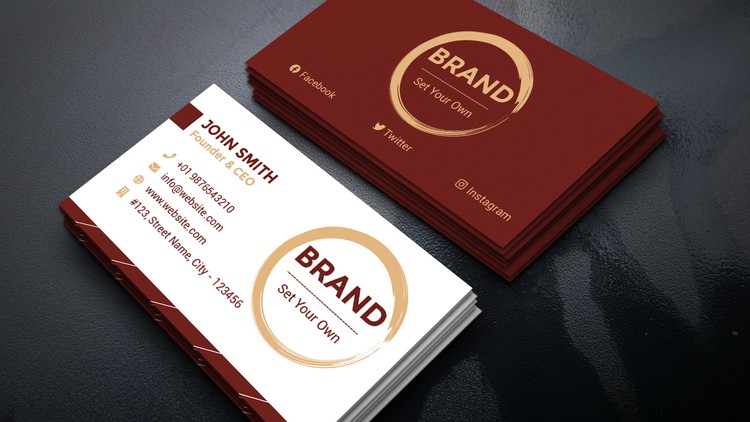
Step-by-Step Guide to Designing a Professional Business Card in Photoshop
Why take this course?
🚀 Mastering Business Card Design with Photoshop 🎨
Course Headline:
Step-by-Step Guide to Designing a Professional Business Card in Photoshop
Course Description:
Embark on a Creative Journey with Our Expert-Led Online Course!
🔍 Understanding the Basics:
- Learn the fundamental design principles for business card creation.
- Discover how to select the perfect layout, typography, and color scheme that aligns with your brand’s identity.
✏️ Designing Your Business Card in Photoshop:
- Get started with setting up your Photoshop document and mastering the use of guides and rulers for precision.
- Dive into the world of layers to organize your elements efficiently and maintain a clean workspace.
🎨 Creative Techniques and Tips:
- Create and manipulate shapes to enhance your design’s visual appeal.
- Add compelling text and images with step-by-step guidance on applying layer styles that will make your business card stand out.
- Explore advanced features like gradients, patterns, and blending options to add a touch of sophistication to your design.
💡 Business Card Design Best Practices:
- Learn how to effectively use contrasting colors to make your brand pop.
- Incorporate your logo tastefully to solidify brand recognition.
- Discover unique shapes and textures that will set your business card apart from the rest.
🔑 Real-Time Examples and Best Practices:
- Gain insights from real-world examples that showcase successful business card designs.
- Understand best practices in design that ensure your business card communicates professionalism and effectiveness.
🎓 For Everyone:
- Whether you’re a novice designer or a seasoned pro, this course is tailored to all skill levels.
- Elevate your design skills and create a business card that truly represents your brand’s values and personality.
Why Take This Course?
- Practical Skills: Acquire hands-on experience in designing professional business cards with Photoshop.
- Real-World Application: Learn design principles that will serve you across various projects and mediums.
- Showcase Your Work: Create a portfolio piece that can be used to showcase your skills to potential clients or employers.
- Networking Opportunity: Connect with fellow designers and industry professionals within the course community.
Ready to Transform Your Design Skills?
Join us now and embark on a creative adventure that will elevate your business card designs to new heights. With Photoshop as your tool and our comprehensive guide, you’ll master the art of professional business card design in no time! 🌟
- Course Overview
- Exploring the strategic intersection of marketing and graphic design, focusing on how to condense a brand’s entire identity into a standard 3.5 by 2-inch canvas.
- Understanding the importance of visual hierarchy to ensure that contact information is legible while maintaining an aesthetic appeal.
- Navigating the unique challenges of small-scale design, including whitespace management and the psychology of color in professional networking.
- Analyzing the transition from digital concepts to physical products, emphasizing the tactile nature of business stationery.
- Learning to build a modular design framework that allows for quick iterations and variations for different team members or clients.
- Requirements / Prerequisites
- A working installation of Adobe Photoshop (Creative Cloud version is recommended for the latest features, but older versions are applicable).
- Basic familiarity with computer file systems and general software navigation.
- No prior graphic design experience is required, though a creative interest in branding is highly beneficial.
- A functional mouse or digital tablet for precise manipulation of design elements and paths.
- Skills Covered / Tools Used
- Mastering Document Setup specifically for print, including the configuration of CMYK Color Profiles and high-definition 300 DPI resolution.
- Implementing Bleed, Trim, and Safety Guides to prevent critical design elements from being lost during the mechanical cutting process.
- Advanced use of the Type Tool to manage font pairing, tracking, and leading for maximum professional readability.
- Utilizing Vector Shape Layers and the Pen Tool to create crisp, scalable logos and decorative icons that do not pixelate.
- Applying Clipping Masks and Adjustment Layers to integrate brand imagery and maintain non-destructive editing workflows.
- Exploring Layer Styles such as subtle drop shadows, inner glows, and gradients to add depth and a premium feel to the card.
- Optimizing the Export Process to generate print-ready PDFs with embedded fonts and flattened transparencies.
- Benefits / Outcomes
- Acquisition of a specialized skill set that allows you to offer professional branding services to local businesses or freelance clients.
- The creation of a high-quality, custom business card that serves as a standout piece in your creative portfolio.
- Increased technical confidence in handling complex print specifications, reducing the risk of costly printing errors.
- Development of a streamlined workflow that can be adapted for other corporate identity materials like flyers and letterheads.
- PROS
- Practical, project-based learning that results in a tangible asset immediately upon completion.
- Focuses on industry-standard software, making the skills highly transferable to other design niches.
- Efficient curriculum that prioritizes essential tools over unnecessary technical jargon.
- CONS
- The highly specialized focus on business cards may feel restrictive for students seeking a broad, all-purpose Photoshop education.