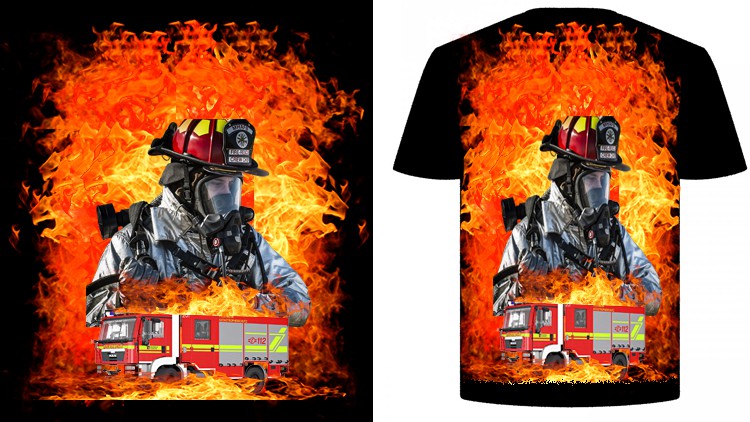
Design Stylish TShirt Photoshop With Adobe Photoshop CC and Learn How To Earn Money By T-Shirt Design
What you will learn
How to design a colorful fire fighter t-shirt
How to design a Hero Soldier t-shirt with green army color
How to design a pure black and white Wanted t-shirt
How to design a lumberjack t-shirt with only use of elements
Description
In this course you will learn How to create or design your own custom T-Shirt In Photoshop. This course is for Intermediate skill levels, so you will find this course easy to follow if you have basic photoshop knowledge. You will learn how to design a fire fighter tshirt, how to design hero soldier or I’d rather die like a man than live like a coward tagline design, how to design a wanted black and white tshirt, how design a lumberjack tshirt using only with elements. You will have class project for every lessons, so once you will learn a lesson you will have to do class project so than you will have practice during learning.
What This Course Includes:
· Free T-Shirt Mock up
· Complete PSD File
· Life-Time Access
· Support From Me
· Free Design Graphics and Elements
· New Updates Often
So once you will complete this course you will be able to design a t-shirt in Adobe Photoshop CC and you will now the sites in where you can sell the design of your t-shirt. Let me clear you one things that once you complete this course you will be able to upload or create gigs on fiverr for selling your tshirt as well as you will learn how to sell tshirt design in teespring. So this tshirt design masterclass is perfect for you if you want to learn t-shirt designing.
Content
Introduction
T-Shirt Design In Photoshop
Overview: A Gritty, Practical Deep Dive into the POD Hustle
Let’s be real for a second—there is no shortage of “learn Photoshop” courses out there. Most of them are dry, academic slogs that teach you every single filter in the menu without actually showing you how to build something that sells. That’s where the T-Shirt Design Masterclass In Photoshop caught my eye. As someone who’s spent years navigating industry-standard tools, I’ve learned that the gap between “knowing the software” and “creating a marketable product” is a massive chasm. This course doesn’t just teach you how to click buttons; it bridges that gap by focusing specifically on the aesthetic and technical requirements of the Print-on-Demand (POD) market.
What I appreciated most about the instructor’s approach is the lack of fluff. We aren’t spending hours talking about color theory in the abstract. Instead, the course dives straight into the “why” behind specific design trends. It treats design like a hands-on lab session where the end goal is a job-ready skill set. You’re learning how to manipulate assets, manage complex layer structures, and—most importantly—how to think like a designer who needs to cater to specific subcultures, from first responders to the outdoor enthusiast niche. It’s a pragmatic look at real-world projects that translates directly into a side hustle or a full-time creative career.
The flow of the course is surprisingly logical. It moves from high-intensity, colorful compositions to minimalist, element-driven designs. This variety ensures that by the end of the masterclass, you aren’t just a one-trick pony. You’ll have a portfolio that shows versatility, which is the cornerstone of career growth in the freelance world. Whether you’re looking to dominate Merch by Amazon or launch your own Shopify brand, the insights here regarding composition and “sell-ability” are gold.
Prerequisites
- A basic understanding of the Windows or macOS interface: You should know how to manage files and folders.
- Adobe Photoshop CC installed: While older versions might work, the course utilizes features found in the Creative Cloud suite.
- A creative mindset: You don’t need to be a master illustrator, but a willingness to experiment with layouts is key.
- No prior design experience required: This takes you from beginner to advanced concepts through guided repetition.
Skills & Tools You’ll Master
- Adobe Photoshop CC: Deep mastery of the most essential industry-standard tool for raster graphics.
- Layer Masking & Blending: Learning how to non-destructively edit and blend disparate elements into a cohesive design.
- Typography Management: Choosing and styling fonts that resonate with specific target audiences.
- Color Grading & Correction: Making colors “pop” for fabric printing, ensuring the final product looks as good on a shirt as it does on a screen.
- Asset Composition: The art of using stock elements and vectors to build high-end custom graphics without drawing from scratch.
- Print-Ready Exporting: Understanding DPI, color modes (CMYK vs. RGB), and transparency for various POD platforms.
Career Benefits & Job Roles
Completing this masterclass isn’t just about making one-off shirts; it’s about certification prep for the school of hard knocks in the digital economy. The job-ready skills gained here open doors to several lucrative paths:
- Freelance Graphic Designer: Take on high-paying clients on platforms like Upwork or Fiverr specifically for apparel design.
- E-commerce Entrepreneur: Build your own brand on platforms like Printful, Redbubble, or Teespring.
- In-house Apparel Designer: Work for local screen-printing shops or national clothing brands.
- Creative Director for Merch: Oversee the visual identity of influencers or corporate brands looking to monetize through clothing.
Pros
- Niche-Focused Training: Instead of generic shapes, you work on high-demand niches like military and firefighter themes, which are proven money-makers in the t-shirt world.
- Workflow Efficiency: The instructor shares “pro-tips” on how to speed up the design process, which is vital when you need to scale a POD business.
- Portfolio-Ready Output: By the end of the course, you have four distinct, professional-grade designs that can serve as the foundation for your career growth.
- Accessible for Non-Artists: It proves that you don’t need to be a traditional artist to be a great designer; you just need to master the industry-standard tools and composition.
Cons
- Photoshop Obsession: While the course is a “Photoshop Masterclass,” I would have liked to see a small segment on vectorizing these designs in Illustrator. Many high-end screen printers still prefer vector files for specific jobs, and relying solely on raster (Photoshop) can occasionally be a bottleneck in a professional workflow.