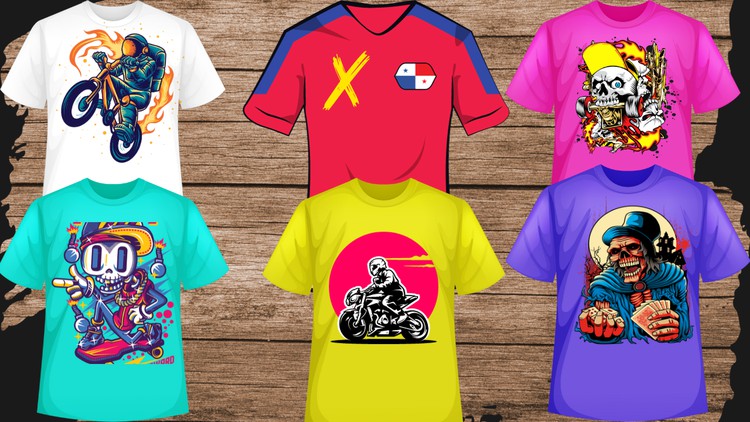
Become a T-Shirt Design Pro: Learn Advanced Techniques with Adobe Illustrator
What you will learn
The basics of Adobe Illustrator, including the interface, tools, and features
How to create custom shapes and illustrations
How to use typography effectively in your designs
How to apply colors, gradients, and effects
How to create distressed and vintage looks
How to achieve realistic textures
How to optimize your designs for print
Description
Learn how to create professional and eye-catching T-shirt designs with Adobe Illustrator, from scratch to pro.
This comprehensive course covers everything you need to know to design amazing T-shirts, from the basics of Adobe Illustrator to advanced techniques. Whether you’re a complete beginner or an experienced designer looking to improve your skills, this course has something for you.
What you’ll learn:
- The basics of Adobe Illustrator, including the interface, tools, and features
- How to create custom shapes and illustrations
- How to use typography effectively in your designs
- How to apply colors, gradients, and effects
- How to create distressed and vintage looks
- How to achieve realistic textures
- How to optimize your designs for print
- And much more!
Benefits of taking this course:
- Learn from scratch how to design T-shirts using Adobe Illustrator
- Improve your T-shirt design skills and techniques
- Create professional and eye-catching T-shirt designs for any audience
- Sell your T-shirt designs online or start your own T-shirt business
- Add T-shirt design to your portfolio as a creative professional
By the end of this course, you’ll have the skills and confidence to create stunning and marketable T-shirt designs using Adobe Illustrator. Whether you aspire to start your own T-shirt business, freelance as a T-shirt designer, or simply express your creativity through wearable art, this course provides you with the knowledge and tools to turn your ideas into reality. Enroll now and unleash your creativity in the world of T-shirt design!
Enroll today and start creating!
Content
Introduction
An Honest Breakdown: Why Vector Mastery is the Only Way to Design for Apparel
Look, I’ve been in the tech and design ecosystem for over a decade, and if there is one thing I’ve learned, it’s that “good enough” doesn’t cut it when your work is being pressed onto a physical product. I’ve seen way too many talented artists try to jump into the apparel game using raster-based software, only to end up with pixelated messes and frustrated printers. That is exactly why I wanted to dive into T-Shirt Design In Adobe Illustrator for Beginner to Advanced. This isn’t just another tutorial series; it’s a deep dive into the industry-standard tools that actually make a design scalable and sellable.
What sets this course apart from the sea of generic YouTube tutorials is the focus on the “print-first” mindset. Most courses teach you how to make something look good on a high-res monitor. This course forces you to think about how ink interacts with fabric. We’re talking about the transition from a hobbyist to a professional who possesses job-ready skills. It treats the canvas not just as a digital space, but as a blueprint for a physical product. Whether you are looking for a creative outlet or career growth in the fashion tech space, understanding the nuances of vector geometry is your primary barrier to entry.
Prerequisites
Before you jump into the deep end, let’s be real about what you need. You don’t need to be a Da Vinci-level illustrator, but you do need a functional computer that can actually run the Creative Cloud suite without sounding like a jet engine.
- A valid subscription to Adobe Illustrator (the industry standard).
- A basic understanding of how to navigate a computer file system.
- Ideally, a pen tablet (like a Wacom or Huion), though a mouse works if you have the patience of a saint.
- A thick skin for critiques—because your first few vectors will probably have way too many anchor points.
Skills & Tools Mastered
This course functions essentially as a series of hands-on labs where you aren’t just watching—you’re building. The curriculum moves quickly from the “What is this button?” phase into real-world projects that you could actually send to a screen printer tomorrow.
You’ll spend a significant amount of time mastering the Pen Tool and the Shape Builder—tools that are the bread and butter of any professional designer. But the real value lies in the advanced modules. You’ll learn how to manipulate typography so it doesn’t look like a default Windows font, and how to apply distressed and vintage textures without destroying your computer’s RAM. Most importantly, you learn the “boring” but vital stuff: color separations, trapping, and document setup. These are the technical hurdles that separate the amateurs from the pros who understand the certification prep mindset of doing things the right way the first time.
Career Benefits & Job Roles
Why bother with this? Because the “merch” economy is exploding. Companies aren’t just looking for artists; they are looking for production-ready designers. Completing a comprehensive beginner to advanced track like this opens doors that go beyond just making cool shirts for your friends.
- Freelance Graphic Designer: High-end clients pay a premium for vector files that won’t blur when blown up for a billboard or shrunk for a pocket logo.
- Apparel Production Manager: Understanding the technical side of Illustrator makes you the bridge between the creative team and the factory.
- Brand Identity Specialist: T-shirt design is often just one arm of a larger branding package. These skills translate directly into logo design and corporate identity.
- Creative Director: Even if you aren’t the one clicking the mouse, knowing these industry-standard tools allows you to lead teams effectively.
Pros
- Technical Precision: The course doesn’t skip the “why.” You learn why certain stroke weights matter and why global swatches are a lifesaver in real-world projects.
- Scalability: The focus on vector art ensures that your designs are future-proof. You aren’t just learning to make a shirt; you’re learning to create assets that can be used on anything from a sticker to a wrap for a bus.
- Workflow Efficiency: The instructor shares “pro-tips” and keyboard shortcuts that will shave hours off your design time, which is essential for career growth where time is literally money.
Cons
- The Learning Curve: Let’s be honest—Adobe Illustrator is not “user-friendly” for the uninitiated. The course moves fast in the advanced sections, and if you haven’t put in the time on the hands-on labs in the beginner modules, you will feel lost. It requires a genuine time commitment; you can’t just binge-watch this like a Netflix show and expect to be a pro.