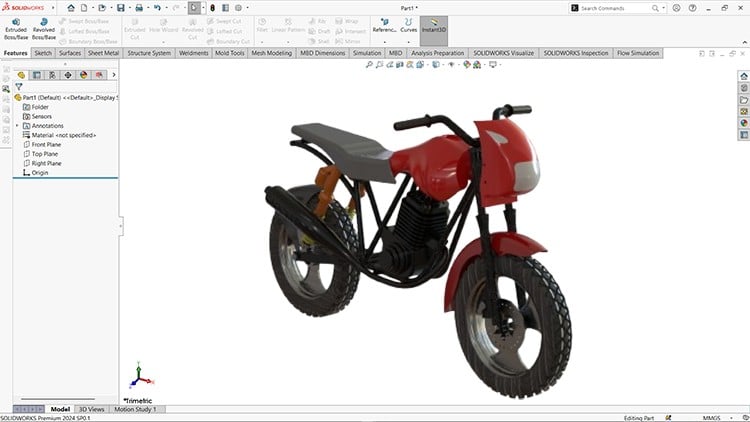
From Basics to Pro Design
⏱️ Length: 8.0 total hours
⭐ 4.22/5 rating
👥 9,429 students
🔄 April 2025 update
Add-On Information:
Note➛ Make sure your 𝐔𝐝𝐞𝐦𝐲 cart has only this course you're going to enroll it now, Remove all other courses from the 𝐔𝐝𝐞𝐦𝐲 cart before Enrolling!
-
Course Overview
- The ‘Mastering SOLIDWORKS (2024-25)’ course provides an updated, comprehensive curriculum, guiding learners from foundational concepts to advanced design proficiency. It’s more than tool instruction, emphasizing design intent and industry-standard problem-solving. This 2024-25 refresh aligns all content, including interface and methodologies, with the latest SOLIDWORKS capabilities, ensuring your skills are relevant and future-proof.
- Adopting a practical, project-centric approach, the course integrates various SOLIDWORKS modules into cohesive design workflows. This holistic method helps you grasp the entire product development lifecycle, from initial concepts to detailed manufacturing documentation. It fosters the ‘why’ behind design decisions, promoting efficient, accurate, adaptable model creation.
- This complete course empowers you with an intuitive command over SOLIDWORKS, enabling confident tackling of complex engineering challenges. It fosters critical design thinking, preparing you to anticipate issues, optimize solutions, and translate intricate ideas into manufacturable designs, cultivating a professional, agile mindset.
-
Requirements / Prerequisites
- Basic Computer Proficiency: Familiarity with general computer operations and file management is expected.
- SOLIDWORKS Software Access: A licensed copy of SOLIDWORKS (version 2024 or 2025 recommended) is crucial for hands-on practice.
- No Prior CAD Experience: The course starts with fundamentals, making it accessible to absolute beginners.
- Commitment to Practice: Independent practice beyond lesson hours is highly recommended to solidify learning and build proficiency.
- Suitable System Specifications: A modern PC with at least an Intel i5/AMD Ryzen 5, 16GB RAM, and a dedicated graphics card is advised for optimal performance.
-
Skills Covered / Tools Used
- Advanced Part Modeling: Master multi-body design, configurations for variations, advanced patterns (sketch-driven), and design tables for robust parametric control.
- Sophisticated Surface Design: Expertise in complex, organic geometries using advanced surfacing tools (boundary, fill, lofted) and precise trimming/knitting.
- Sheet Metal Design: Skills in designing sheet metal parts with flanges, hems, jogs, vents, and generating accurate flat patterns for manufacturing.
- Weldment Structures: Construct structural frameworks using standard or custom profiles, applying end caps, gussets, and intelligent trim/extend functions.
- Advanced Assembly Management: Strategies for large assemblies, top-down/bottom-up design, flexible sub-assemblies, and basic motion studies for kinematic analysis and interference resolution.
- Professional Drafting & GD&T: Generate industry-compliant engineering drawings with multi-sheet layouts, custom title blocks, detailed annotations, various views, and an introduction to Geometric Dimensioning and Tolerancing (GD&T).
- Productivity & Customization: Enhance workflow by customizing the UI, creating shortcuts, utilizing macros, and implementing effective file management for collaborative environments.
- Introductory Simulation: Understand design validation through basic simulation, applying materials, fixtures, and loads for simple static stress analysis.
- PhotoView 360 Rendering: Learn fundamentals of creating photorealistic renderings using PhotoView 360, applying materials, scenes, and lighting for impactful visual presentations.
-
Benefits / Outcomes
- Accelerated Career Growth: Develop highly marketable CAD skills for roles in mechanical design, product development, and manufacturing across diverse industries.
- Robust Portfolio Creation: Build a strong professional portfolio showcasing a range of complex CAD models and engineering drawings, essential for demonstrating practical design capabilities.
- Enhanced Design Proficiency: Gain confidence to translate intricate concepts into precise, manufacturable 3D models, fostering creativity and problem-solving.
- Industry-Standard Competence: Master best practices in CAD modeling and documentation, ensuring designs meet professional standards for functionality and communication.
- Certification Pathway: Acquire skills for official SOLIDWORKS certifications (CSWA, CSWP).
- Optimized Design Workflows: Learn efficient data management, integration, and collaborative strategies to streamline product development and boost team productivity.
-
PROS
- Up-to-Date Content: Aligned with 2024-25 SOLIDWORKS, ensuring relevance and coverage of the latest features.
- Comprehensive Coverage: Spans fundamental to advanced topics across key modules for a holistic learning journey.
- Practical Application: Emphasizes project-based learning for immediate, hands-on experience.
- Career-Oriented Skills: Develops employable skills highly valued in various engineering and design sectors.
- Flexible Learning: Self-paced format accommodates individual schedules and learning preferences.
-
CONS
- Demands Independent Practice: Achieving true mastery, given the 8-hour duration, requires significant self-driven practice beyond the course content.
Learning Tracks: English,Design,Design Tools