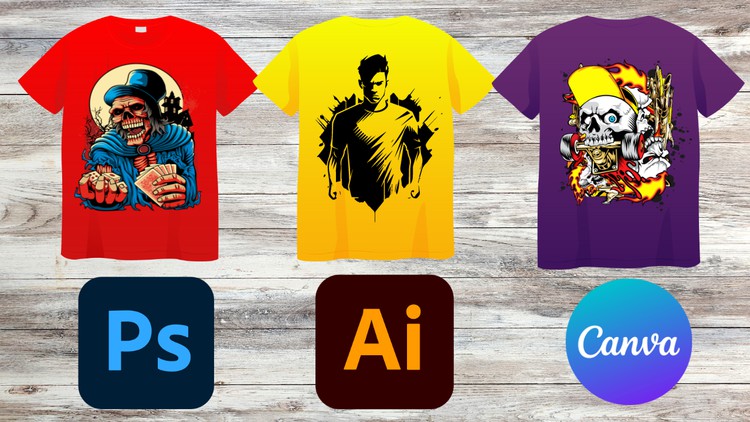
Design Like a Pro: Master T-Shirts with Photoshop, Illustrator and Canva
What you will learn
Character Designing with Basic Tools
T-Shirt Designing with a Typography
T-Shirt Design with Wrap Text and Custom Shape
Logo T-Shirt Design
Designing an Advanced Zazzle T-Shirt Design
Designing T-Shirt with an Image
Description
Hello everyone welcome to our class of T-Shirt Designing in Illustrator, Photoshop and Canva tutorial for learning stunning designs to make your own customized T-Shirt so if you are planning to learn than you are in right place because we will cover the advanced projects . This is an advanced level class so if you have no previous experience than you can get some basic knowledge about Illustrator, Photoshop and Canva first.
Lets take a look what you will learn from this class:
Illustrator
1. Character Designing with Basic Tools
2. T-Shirt Designing with a Typography
3. Designing a Retro Sunset T-Shirt
4. T-Shirt Design with Wrap Text and Custom Shape
5. Summer T-Shirt Design
Photoshop
1. T-Shirt Design with Basic Texts
2. Summer T-Shirt Design
3. Designing an Advanced Zazzle T-Shirt Design
4. Logo T-Shirt Design
Canva
1. Summer T-Shirt Design in Canva
2. Stunning Typography T-Shirt Design
3. Logo T-Shirt Design
4. Designing T-Shirt with an Image
After complete this class you will be able to:
– Understand in depth about Designing
– You will be able to design T-Shirt of different Theme
– You will learn how to Align objects in a Design
– Learn how to design T-Shirt in different software
– Understand about T-Shirt Designing in Depth
This is a project based class so during learning you will have class project so what you learned you will be able to participate in class project so you can do practice while you are learning. You will have supporting resource in this class so it will be easier for you to learn.
During learning if you face any issue or if you have any question than feel free to ask me I am always there for you to help you. So lets start learning T-Shirt Designing with Illustrator, Photoshop and Canva together.
Content
T-Shirt Design With Canva
T-Shirt Design With Adobe Photoshop
T-Shirt Design With Adobe Illustrator
Overview: Design Like a Pro: Master T-Shirts with Photoshop, Illustrator and Canva
Alright, let’s cut to the chase. If you’ve ever looked at the booming print-on-demand market and thought, "I could totally do that," but felt a bit overwhelmed by the design aspect, this course, 'Learn T-Shirt Design with Photoshop Illustrator and Canva', might just be your ticket. My take? This isn't just another run-of-the-mill tutorial; it's a solid, practical dive into becoming a competent T-shirt designer, leveraging not one, but three powerhouses in the design world. What I appreciated most right off the bat is its pragmatic approach to teaching a diverse skill set needed for the modern apparel design landscape.
Forget the fluffy intros. This course quickly gets into the nitty-gritty of what makes a T-shirt design sell, from initial concept to execution. It effectively bridges the gap between creative vision and technical proficiency. We're talking about more than just slapping text onto a shirt; it’s about understanding composition, typography, and how different visual elements come together for commercial appeal. Frankly, in a marketplace saturated with generic designs, the ability to produce unique, high-quality graphics using industry-standard tools like Photoshop and Illustrator, alongside the accessibility of Canva, is a significant competitive advantage. This course empowers you to not just design, but to design effectively for various niches, ultimately preparing you for real-world projects and potential career growth in the lucrative e-commerce space.
Prerequisites
Here’s the deal: while the course is structured to take you from a beginner to advanced understanding in specific areas, a modicum of familiarity with graphic design concepts or at least a genuine interest in learning design software would be beneficial. You don't need to be a Photoshop wizard, but don't expect it to teach you how to use a mouse. Having Photoshop, Illustrator, and access to Canva already installed or understanding the subscription model for Adobe Creative Cloud is a must. If you're completely new to design tools, be prepared for a slightly steeper learning curve initially as you navigate interfaces, but the content itself breaks things down well. It's less about prerequisite skills and more about having the right mindset and tools ready to go.
Skills & Tools You'll Master
This course is a triple threat, equipping you with expertise across various platforms. You'll gain hands-on proficiency with:
- Adobe Photoshop: For advanced image manipulation, creating intricate textures, and refining raster-based designs.
- Adobe Illustrator: Essential for scalable vector graphics, precise typography, character design, and logo creation – critical for clean, professional print results.
- Canva: For quick mock-ups, leveraging templates, and understanding how to streamline design processes, especially useful for those rapid-fire social media graphics or quick design iterations.
Beyond the software, you’ll develop crucial design skills including character designing from basic shapes, mastering typography for impactful messages, creating dynamic layouts with wrap text and custom shapes, and designing compelling logos. The curriculum’s coverage extends to designing advanced Zazzle T-shirt designs and integrating images effectively, ensuring your designs are production-ready and market-appropriate. These are truly job-ready skills that extend beyond just T-shirts.
Career Benefits & Job Roles
The skills gleaned from this course open up a surprising number of avenues for both creative professionals and budding entrepreneurs. Mastering these tools and techniques means you’re not just dabbling; you’re building a portfolio of real-world projects that can directly lead to:
- Freelance T-Shirt Designer: Offering your services on platforms like Upwork, Fiverr, or directly to brands.
- Print-on-Demand Entrepreneur: Launching your own online store on platforms like Merch by Amazon, Redbubble, or Etsy, using your newly acquired design prowess.
- Graphic Designer (Apparel Specialist): Working for clothing brands, marketing agencies, or promotional product companies.
- Digital Content Creator: Leveraging your design skills for various online content, beyond just T-shirts, given the versatility of Photoshop, Illustrator, and Canva.
The practical nature of the hands-on labs means you're building a portfolio as you learn, significantly boosting your employability and potential for substantial career growth in the dynamic creative industry. It’s an investment in practical, marketable skills.
Pros
- Comprehensive Multi-Tool Approach: Unlike courses that stick to one software, this one dives deep into Photoshop, Illustrator, and Canva. This is invaluable, as a professional designer often juggles multiple tools for different aspects of a project. It truly prepares you with versatile industry-standard tools.
- Actionable, Project-Based Learning: The course is packed with specific, actionable design challenges, like creating a Logo T-Shirt or an Advanced Zazzle design. These aren't just theoretical lessons; they're hands-on labs that result in tangible output, building your portfolio with real-world projects.
- Breadth of Design Styles Covered: From character design and typography to complex wrap text and image integration, the curriculum is diverse. It ensures you’re not just a one-trick pony, giving you a broad palette of job-ready skills to tackle various client demands or personal projects.
- Focus on Market Relevance: The inclusion of Zazzle-specific design principles and the general emphasis on creating commercially viable designs is a huge plus. It’s not just about aesthetics; it's about designing for sales and understanding the print-on-demand ecosystem.
Cons
- Pacing for Absolute Beginners: While the course claims to take you from beginner to advanced, juggling three powerful software applications simultaneously might feel overwhelming for someone with absolutely zero prior design experience. The pace can be quick in sections, assuming a certain level of tech comfort, which might necessitate pausing and re-watching for true novices. More extensive foundational modules on each software's interface might have smoothed this out.