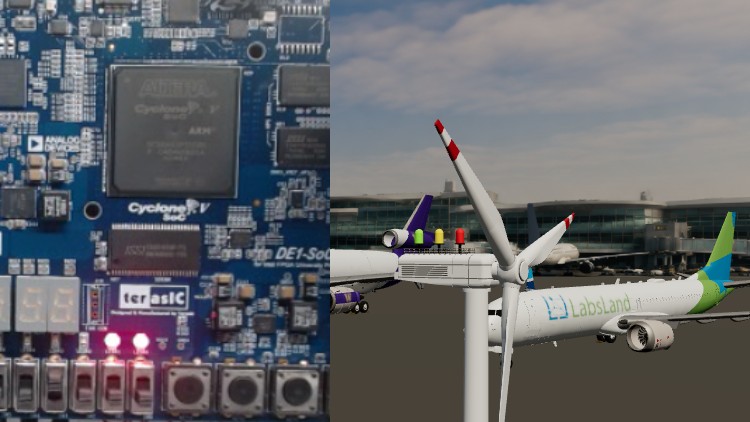
Build circuits and control a virtual 3D wind station in your browser. No board purchase or desktop tools needed.
What You Will Learn:
- Write small Verilog circuits and run them on a real FPGA through a browser-based lab.
- Use switches, logic gates, multiplexers and seven-segment displays to build useful circuits.
- Build a register that remembers a value and a counter you can pause and reset.
- Complete and test the decision logic of a virtual 3D wind station controlled by a physical FPGA.
- Read a simple timing trace and compare a circuit’s expected behavior with its observed results.
- Diagnose common coding, signal-polarity and state-transition mistakes.
Overview: Breaking the Entry Barrier to Hardware Design
If you’ve been in the tech industry long enough, you know that FPGA development has a notoriously steep learning curve. Usually, your first week is spent wrestling with massive 40GB IDE installations like Vivado or Quartus, only to find out your driver isn’t compatible with your OS. The “FPGA for Beginners: Build Verilog Circuits on Real Hardware” course is a breath of fresh air because it completely bypasses that “toolchain hell.”
My honest take? This course understands that the best way to learn digital logic design is through immediate feedback, not configuration manuals. By utilizing a browser-based hands-on lab, you are interacting with actual physical silicon located in a remote server rack. You write your Verilog code, hit a button, and see the bitstream execute on a real board. This isn’t just another dry lecture series; it’s a high-octane introduction to hardware description languages (HDL) that prioritizes the “Aha!” moments over the tedious setup. The inclusion of a virtual 3D wind station adds a layer of real-world projects that most beginner courses lack, making the transition from logic gates to system-level thinking feel seamless.
Prerequisites: What You Actually Need
While the course is labeled for beginners, you’ll get the most out of it if you have a baseline understanding of basic computer science concepts. You don’t need to be a C++ wizard, but knowing how binary works and having a general idea of “if-then-else” logic will help you move faster.
- Basic Logic Concepts: Familiarity with AND, OR, and NOT gates is helpful but not strictly required.
- Computer Literacy: If you can navigate a browser and understand a basic text editor, you’re ready.
- No Hardware Required: You specifically do NOT need to buy a physical FPGA development board or install desktop software.
Skills & Tools: Mastering the Industry Standard
This course focuses on Verilog, which is an industry-standard tool used by giants like NVIDIA, Intel, and Apple. You aren’t learning a “toy” language; you’re learning how to define hardware at the RTL (Register Transfer Level) scale. You’ll spend significant time with logic gates, multiplexers, and sequential logic elements like registers and counters.
One of the most critical job-ready skills taught here is reading timing traces. In the professional world, debugging isn’t just about finding a syntax error; it’s about understanding the “when” as much as the “what.” Comparing expected behavior with observed results in a trace is exactly what a Hardware Validation Engineer does every single day. You will also learn to diagnose signal-polarity issues and state-transition mistakes, which are the bread and butter of FPGA debugging.
Career Benefits & Job Roles: Building a Foundation for Growth
Completing this course is a solid first step toward career growth in specialized engineering fields. It serves as excellent certification prep for those looking to move into more advanced hardware certifications or university-level digital design programs. If you are a software dev looking to pivot, understanding how the underlying hardware actually processes your instructions is an invaluable asset.
Common job roles that require these skills include:
- FPGA Engineer: Designing custom hardware accelerators for data centers or AI.
- Embedded Systems Developer: Writing the low-level code that controls everything from medical devices to automotive ECUs.
- ASIC Design Engineer: Moving from FPGA prototypes to mass-produced silicon chips.
- Hardware Validation Engineer: Using hands-on labs techniques to ensure new hardware meets rigorous specifications.
Pros: Why This Course Stands Out
- Frictionless Environment: The ability to run Verilog on real hardware through a browser is a game-changer. It eliminates the cost and technical barriers that usually stop beginners in their tracks.
- Visual Feedback: Using seven-segment displays and a 3D wind station makes abstract concepts feel tangible. You aren’t just looking at text output; you’re seeing hardware react in real-time.
- Focus on Debugging: Most courses show you how to do things right; this course teaches you how to fix things when they go wrong. Learning to read timing traces is worth the price of admission alone.
Cons: The Honest Trade-off
The only real downside is that by shielding you from the industry-standard tools like Vivado or Quartus, you miss out on learning the (admittedly painful) complexity of full-scale synthesis and place-and-route workflows. While this is great for a beginner to advanced pipeline, you will eventually need to tackle those local “monster” tools if you want to work on real-world projects at a professional scale. It’s a brilliant starting point, but don’t expect it to be the last toolset you’ll ever need to learn.