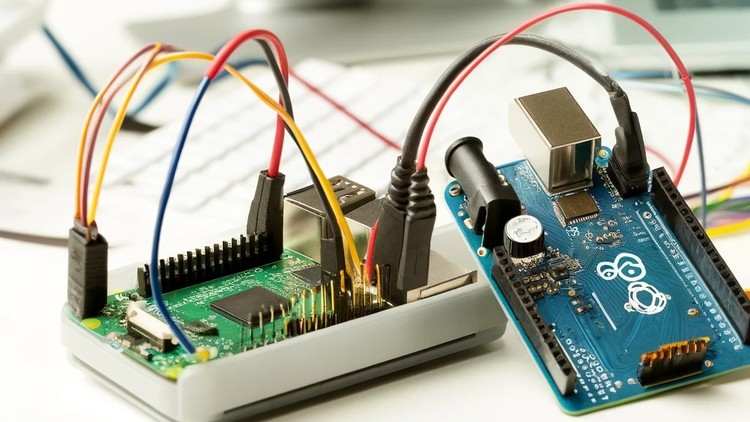
In this Course you will learn how to connect Raspberry Pi and Arduino the software and hardware part and why it’s useful
What you will learn
Related Topics
Why take this course?
🌟 Connect and Interface Raspberry Pi with Arduino: A Comprehensive Guide 🌟
👉 Course Overview: In this Course 🚀, you will dive into the fascinating world of interfacing Raspberry Pi and Arduino! You’ll learn about the software and hardware integration of these two powerful devices, their advantages, and why they are a game-changer in the realm of electronics and programming.
🎓 Why you should take this course? 🤔
- ✅ Learn the intricacies of connecting Raspberry Pi and Arduino software and hardware.
- ✅ Understand the pros and cons of interfacing these two devices for informed decision-making.
- ✅ Receive a certificate of completion to showcase your new skills.
- ✅ Explore the benefits of combining Raspberry Pi’s computing power with Arduino’s flexibility in microcontroller projects.
- ✅ Engage with quizzes throughout the course to test your knowledge and reinforce learning.
🔄 Continual Updates ✏️
This course is designed to stay up-to-date with the latest developments in technology, ensuring that you receive accurate and relevant information.
📚 About the Instructor 🎓
- The Educational Engineering Team is a seasoned group of skilled engineers with over 13 years of experience in the microcontroller industry.
- With a mission to demystify complex topics, they offer hands-on, practical knowledge that you can apply immediately.
- The team has taught over 250k-THOUSAND students worldwide, helping them pursue careers in electronics and programming.
🔧 What you will learn 👩💻👨💻
- How to safely connect and configure Raspberry Pi and Arduino hardware.
- Best practices for software configuration to achieve seamless interfacing between the two devices.
- Ways to protect your Raspberry Pi from potential damage during interfacing.
- Practical applications and real-world projects that leverage the strengths of both Raspberry Pi and Arduino.
- Troubleshooting tips for common issues encountered in interfacing.
👥 Who is this course for? 🏫
- Electronics and programming enthusiasts eager to expand their skills.
- Students and professionals seeking to enhance their knowledge of microcontrollers.
- Hobbyists fascinated by Raspberry Pi and Arduino projects who want to build something unique.
- Anyone interested in the practical applications of these powerful microcontroller platforms.
📋 Requirements 🛠️
- Basic knowledge of electronics and programming.
- A computer with internet access to follow along with the course materials.
- A Raspberry Pi and Arduino board along with necessary components for hands-on learning.
- A passion for learning and a willingness to dive into exciting new projects!
Join us on this educational journey and master the art of interfacing Raspberry Pi and Arduino to take your electronics and programming projects to the next level! 🎓🤖✨
A Real-World Take on Hybrid Embedded Systems
Look, if you’ve spent more than five minutes in the maker community or the professional IoT space, you know the age-old debate: Raspberry Pi or Arduino? Most beginners think they have to pick a side. But as someone who has spent years designing real-world projects for industrial automation, I’m here to tell you that the real magic happens when you stop treating them as rivals and start using them as partners. This course, “Connect and Interface Raspberry Pi with Arduino,” dives straight into that sweet spot.
The core philosophy here isn’t just about plugging wires together; it’s about understanding the architectural strengths of different silicon. The Raspberry Pi is a high-level brain—great at networking, heavy lifting, and running a full OS—but it’s notoriously “soft” when it comes to raw, real-time hardware interaction. It’s fragile. One wrong 5V surge into a 3.3V GPIO pin and you’ve got a $50 paperweight. The Arduino, on the other hand, is a tank. It handles the industry-standard tools of power management and signal processing with ease. This course teaches you how to use the Arduino as a “bodyguard” for your Pi, creating a robust, job-ready hardware stack that won’t fry the second you connect a heavy-duty motor.
What You Need Before Diving In
You don’t need a PhD in electrical engineering, but this isn’t exactly “Hello World” territory either. To get the most out of these hands-on labs, you should have a basic grasp of the following:
- Basic Electronics Knowledge: Knowing your way around a breadboard, resistors, and LEDs is essential.
- Python & C++ Foundations: You’ll be jumping between Python on the Pi and C-based sketches for the Arduino, so being comfortable with basic syntax is a must.
- Hardware Access: You’ll obviously need a Raspberry Pi (any recent model) and an Arduino (Uno or Nano work best for these real-world projects).
- Linux CLI: Familiarity with the terminal will make your life much easier when configuring the Pi’s serial ports.
The Toolkit: Skills & Industry-Standard Tools
This course moves you from beginner to advanced by focusing on the communication protocols that actually matter in the field. You aren’t just learning a hobby; you’re gaining job-ready skills. You will master:
- Serial Communication (UART): The bread and butter of chip-to-chip talk.
- I2C and SPI Protocols: Understanding how to bus multiple devices together using industry-standard tools.
- Level Shifting: A critical skill for protecting sensitive 3.3V logic from 5V “heavy” devices.
- Python RPi.GPIO & Serial Libraries: The software bridge that lets your high-level code talk to the metal.
- Firmware Optimization: Writing efficient code that ensures the Arduino handles timing-sensitive tasks while the Pi handles the UI and cloud connectivity.
Career Growth and Job Roles
Why bother with this? Because the career growth potential in IoT and industrial automation is exploding. Companies aren’t looking for people who can just write a script; they want engineers who understand how hardware and software “handshake.” This course acts as excellent certification prep for those looking to move into specialized roles. By mastering this hybrid approach, you position yourself for roles such as:
- IoT Solutions Architect: Designing complex systems that require both edge computing and sensor fusion.
- Firmware Engineer: Writing the low-level code that keeps the industry-standard tools running.
- Automation Technician: Bridging the gap between legacy heavy machinery and modern data analytics.
- Embedded Systems Developer: A role that sits at the heart of modern product design.
Why This Course Hits the Mark (The Pros)
- Practical Safety: I love that it emphasizes using the Arduino as an interface. Protecting your expensive Raspberry Pi from high-voltage spikes is a lesson most people learn the hard way. This course saves you the “blue smoke” heartbreak.
- Architectural Clarity: It moves beyond “how” and explains the “why.” You learn why the Pi’s non-real-time OS is bad for precise motor control and why the Arduino excels there.
- Hands-on Labs: The real-world projects are actually useful. You aren’t just blinking an LED; you’re building a communication bridge that mimics professional industrial setups.
The Honest Truth (The Cons)
If I have one gripe, it’s that the course sometimes glosses over the nuances of “Power Sequencing.” While it teaches you to protect the data pins, it could spend more time on how to share a common ground or use separate power rails for the Arduino when driving high-current loads. In a real-world project, power noise can be a nightmare, and beginners might struggle with that if they aren’t careful.
Final Verdict: If you want to move past simple tutorials and start building resilient, professional-grade systems, this is a must-take. It provides the job-ready skills needed to bridge the gap between high-level computing and low-level hardware control.