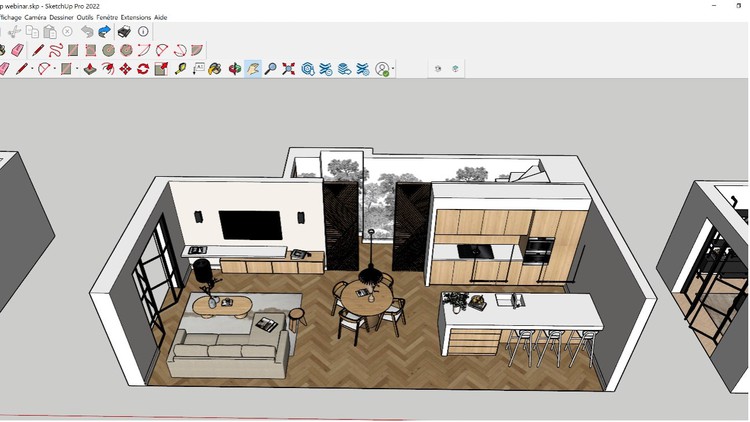
Simple Steps to Building Stunning 3D Models with SketchUp 2023
What you will learn
SketchUp Interface Navigation: Get comfortable with SketchUp’s user interface, learning how to efficiently navigate and access its various tools and features.
Basic SketchUp Tools: Understand and master the use of SketchUp’s fundamental tools including Move, Push/Pull, Rotate, and Scale.
3D Modeling Techniques: Learn to create basic and complex geometric forms, structures, and environments in SketchUp.
Material Application: Develop skills in applying and editing materials for a realistic or stylized look to your 3D models.
Lighting and Shadows: Understand how to set up and manipulate lighting and shadows within your scene to enhance the sense of depth and realism.
3D Rendering Basics: Introduction to rendering techniques in SketchUp, exploring how to bring your models to life with high-quality visuals.
Best Design Practices: Gain knowledge of professional workflows and best practices for efficient 3D design and model organization.
Problem-solving: Learn to troubleshoot common issues that arise during the 3D modeling process.
Overview
Let’s be real for a second: the 3D modeling world is crowded with software that requires a PhD just to draw a cube. If you’ve spent any time in the architectural or design space, you know that SketchUp has often been unfairly labeled as the “simple” sibling to heavyweights like Revit or 3ds Max. However, after diving into SketchUp 2023: The A-Z Course to Mastering 3D Modeling, it’s clear that “simple” is actually its greatest superpower when harnessed correctly. This isn’t just a tutorial on where the buttons are; it’s a deep dive into a streamlined workflow that bridges the gap between a rough concept and a job-ready presentation.
What I appreciated most about this specific 2023 iteration is that it doesn’t waste your time with legacy fluff. It treats SketchUp as the industry-standard tool it has become for rapid prototyping and interior design. The course focuses heavily on the “why” behind the geometry. Instead of just showing you how to pull a wall, it teaches you how to structure a model so it doesn’t fall apart when you need to make revisions—a common pitfall for self-taught users. It’s a beginner to advanced journey that feels less like a classroom and more like a mentorship under a pro who has actually had to meet a client deadline.
Prerequisites
One of the best things about this course is the low barrier to entry. You don’t need a background in engineering or a high-end workstation to get started. Here’s what you actually need:
- A basic computer: SketchUp 2023 is surprisingly efficient, though a dedicated GPU helps when you get into the rendering sections.
- A three-button mouse: Seriously, don’t try to do 3D modeling on a laptop trackpad unless you enjoy frustration.
- A designer’s mindset: While no prior CAD experience is required, having a sense of spatial awareness will help you move through the hands-on labs much faster.
- SketchUp Pro or Trial: You’ll need the software installed to follow along with the real-world projects.
Skills & Tools
This course moves beyond the basic toolbar and gets into the meat of professional 3D production. You’ll start by mastering the “Big Four”—Move, Push/Pull, Rotate, and Scale—but the real value lies in the advanced application of these tools. You’ll learn how to use Groups and Components effectively, which is the difference between a messy file and a professional-grade model.
The curriculum also covers the Extension Warehouse, showing you how to augment SketchUp’s native capabilities to handle complex organic shapes. You’ll gain a solid grasp of the Tags and Outliner systems, which are essential for career growth in large-scale architectural firms. By the end, you aren’t just “drawing”; you are managing a data-rich 3D environment, complete with customized materials and sophisticated lighting setups that mimic real-world physics.
Career Benefits & Job Roles
If you’re looking for certification prep or a way to beef up your portfolio, this course hits the mark. Being proficient in SketchUp 2023 is a massive asset for several high-paying roles. Interior Designers use it for space planning, Architects use it for schematic design, and even Set Designers for film and TV rely on it for quick iterations.
The focus on job-ready skills means you can walk into an interview and show a potential employer a clean, organized 3D model rather than a jumbled mess of faces and edges. In today’s market, the ability to visualize a concept in 3D is no longer a “bonus”—it’s a baseline requirement. Mastering this software is a direct path to roles such as BIM Technician, Junior Architect, or Freelance 3D Visualizer.
Pros
- Hands-on Projects: You aren’t just watching videos; you’re building real-world projects that you can actually use in your professional portfolio.
- Workflow Efficiency: The course emphasizes shortcuts and “the right way” to build, saving you hundreds of hours of troubleshooting down the line.
- Rendering Introduction: Unlike many basic courses, this one touches on 3D rendering basics, giving you the tools to turn “cartoonish” models into high-quality visuals that sell an idea.
- Logical Progression: The beginner to advanced structure is well-paced, ensuring you don’t feel overwhelmed by complex geometry before you’ve mastered the interface.
Cons
- Rendering Depth: While the introduction to rendering is great, SketchUp usually requires third-party plugins (like V-Ray or Enscape) for “photoreal” results. This course provides a solid foundation, but if you want Hollywood-level CGI, you’ll eventually need to supplement this with a dedicated rendering-engine course.