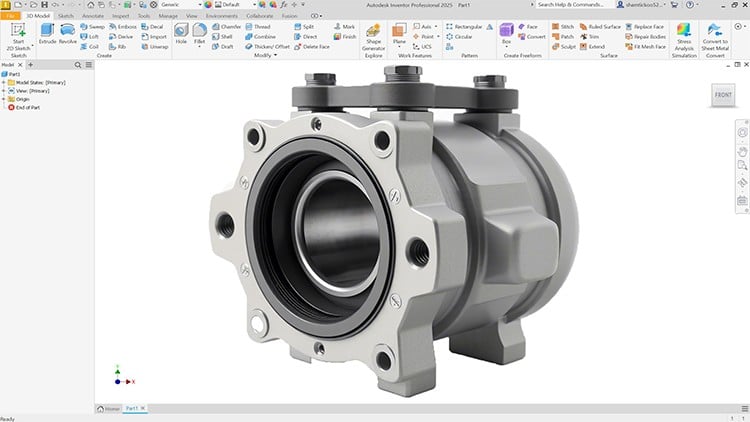
Master Autodesk Inventor 2025: From Sketching to Simulation
⏱️ Length: 9.2 total hours
⭐ 4.54/5 rating
👥 4,657 students
🔄 June 2025 update
Add-On Information:
Note➛ Make sure your 𝐔𝐝𝐞𝐦𝐲 cart has only this course you're going to enroll it now, Remove all other courses from the 𝐔𝐝𝐞𝐦𝐲 cart before Enrolling!
- Course Overview
- This comprehensive tutorial guide, “Autodesk Inventor: A Complete Step-by-Step Tutorial Guide,” offers an immersive learning experience specifically tailored for Autodesk Inventor 2025. Designed for both aspiring engineers and experienced professionals looking to update their skills, this course transforms conceptual designs into tangible 3D models with precision and efficiency. Over 9.2 hours of expertly crafted content, learners will progressively navigate through Inventor’s powerful environment, mastering its array of tools and functionalities.
- Beginning with foundational principles, the course meticulously builds up to advanced design methodologies, ensuring a solid understanding of each concept before moving forward. It emphasizes practical application, providing a clear pathway from initial design intent to the final rendered product and analytical validation. The curriculum is structured to foster a deep comprehension of product development lifecycles, preparing participants to confidently tackle complex engineering challenges.
- With content updated in June 2025, you are guaranteed to learn the most current best practices and features of Inventor. The step-by-step approach ensures that every learner, regardless of prior CAD experience, can follow along and achieve mastery. This guide isn’t just about clicking buttons; it’s about understanding the ‘why’ behind each design decision, enabling intelligent and robust engineering solutions.
- Requirements / Prerequisites
- A personal computer capable of running Autodesk Inventor 2025 (Windows operating system recommended).
- A licensed copy or a free trial version of Autodesk Inventor 2025 installed and ready for use.
- Basic computer literacy and familiarity with navigating software interfaces.
- A strong desire to learn 3D CAD modeling and design principles.
- No prior experience with Autodesk Inventor or any other CAD software is strictly necessary, making it ideal for beginners.
- An understanding of basic mechanical concepts and geometric shapes is beneficial but not mandatory.
- Skills Covered / Tools Used
- Precision Part Design: Utilizing advanced drawing tools for accurate 2D sketch creation, including geometric constructions and dimensioning strategies.
- Feature-Based Modeling: Developing complex 3D solid models using a variety of features such as extrude, revolve, sweep, loft, chamfer, fillet, shell, and rib operations.
- Adaptive Design Techniques: Employing techniques like iFeatures, iParts, and iAssemblies to streamline design workflows and promote design reuse.
- Surface Modeling Basics: Introduction to creating and manipulating freeform surfaces for aesthetically driven or complex geometry.
- Advanced Assembly Techniques: Implementing top-down and bottom-up assembly strategies, applying various types of assembly constraints (mate, flush, angle, insert, tangent) to define component relationships and motion.
- Assembly Visualization & Analysis: Generating exploded views for assembly instructions, conducting interference detection, and basic contact set analysis to ensure proper fit and function.
- Technical Documentation & Drafting: Creating professional 2D engineering drawings from 3D models, including standard views, section views, detail views, and auxiliary views.
- Annotation & Dimensioning: Applying industry-standard dimensions, tolerances, surface finishes, and symbols in drawing environments.
- Sheet Metal Fabrication: Designing sheet metal parts, including bends, flanges, hems, punches, and developing flat patterns for manufacturing.
- Finite Element Analysis (FEA) Introduction: Setting up basic stress analysis simulations, applying material properties, loads, and boundary conditions, and interpreting visual results to validate designs.
- Design Optimization: Using simulation feedback to iterate and improve design performance, material usage, and structural integrity.
- Parametric Design Automation: Brief introduction to design tables and parameters to drive model variations efficiently.
- Photorealistic Rendering: Generating high-quality visual representations of your designs using Inventor’s rendering capabilities.
- Data Exchange: Exporting designs in various formats (e.g., STEP, IGES, STL) for collaboration, manufacturing, or 3D printing.
- Benefits / Outcomes
- Gain profound confidence in operating Autodesk Inventor 2025 for diverse mechanical design projects.
- Develop the ability to translate conceptual ideas into robust, parametrically controlled 3D models and assemblies.
- Acquire skills crucial for roles in product design, mechanical engineering, manufacturing, and CAD drafting.
- Master efficient design workflows that significantly reduce development time and enhance productivity.
- Be proficient in creating accurate technical drawings and documentation suitable for manufacturing.
- Understand the fundamentals of structural analysis to design safer and more reliable products.
- Possess a portfolio of practical Inventor projects showcasing your newly acquired expertise.
- Elevate your problem-solving capabilities by leveraging Inventor’s analytical and design verification tools.
- Equip yourself with an in-demand skillset that is highly valued across various industries utilizing CAD software.
- PROS
- Up-to-date Content: Features Autodesk Inventor 2025 with a recent June 2025 update, ensuring relevance and alignment with the latest software version.
- Beginner-Friendly: Designed as a complete step-by-step guide, making complex topics accessible and easy to follow for new users.
- Practical Application: Focuses on real-world examples and workflows, allowing learners to apply knowledge immediately.
- Comprehensive Coverage: Covers a broad spectrum of Inventor functionalities from initial sketching to advanced simulation within a manageable timeframe.
- High Student Satisfaction: A strong rating of 4.54/5 from over 4,600 students indicates a high level of course quality and effectiveness.
- CONS
- A significant time commitment is required to fully absorb and practice all the concepts presented within the 9.2 total hours.
Learning Tracks: English,Design,Design Tools