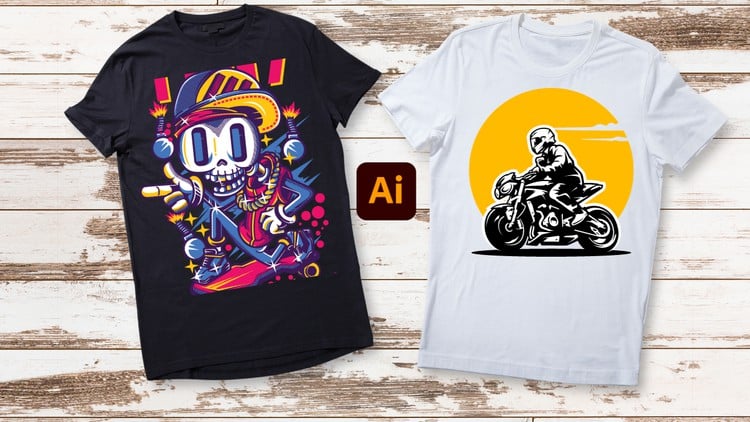
Unleash Your Creativity: From Beginner Brushstrokes to Expert Masterpieces – T-Shirt Design in Adobe Illustrator
⏱️ Length: 4.4 total hours
⭐ 4.24/5 rating
👥 18,670 students
🔄 November 2023 update
Add-On Information:
Note➛ Make sure your 𝐔𝐝𝐞𝐦𝐲 cart has only this course you're going to enroll it now, Remove all other courses from the 𝐔𝐝𝐞𝐦𝐲 cart before Enrolling!
- Course Overview
- Embark on a comprehensive journey from aspiring artist to accomplished apparel designer with this in-depth Adobe Illustrator course specifically tailored for T-shirt design.
- Master the essential techniques and advanced strategies to translate your creative visions into commercially viable and aesthetically striking T-shirt graphics.
- This program is meticulously structured to guide you through the entire design lifecycle, from initial concept generation to final file preparation for printing.
- Discover how to leverage the powerful capabilities of Adobe Illustrator to create unique, eye-catching artwork that stands out in the competitive apparel market.
- Whether you’re looking to launch your own T-shirt brand, create custom merchandise, or enhance your graphic design portfolio, this course provides the foundational knowledge and expert insights you need.
- The curriculum emphasizes a hands-on, project-based approach, ensuring you gain practical experience with every concept learned.
- You’ll move beyond basic shape creation to understand the nuances of composition, color theory, and typography specifically as they apply to garment design.
- Learn to think like a professional T-shirt designer, considering factors like printability, scalability, and target audience appeal.
- The course is updated to reflect current design trends and software functionalities within Adobe Illustrator.
- Benefit from a structured learning path that builds confidence and skill incrementally, catering to individuals with little to no prior experience in vector graphics or apparel design.
- Requirements / Prerequisites
- Access to a computer capable of running Adobe Illustrator.
- A licensed or trial version of Adobe Illustrator installed on your system.
- A stable internet connection to access course materials and video lectures.
- Basic computer literacy and familiarity with navigating software interfaces.
- An eagerness to learn and experiment with digital design tools.
- No prior experience with Adobe Illustrator or graphic design is strictly necessary, making it accessible for absolute beginners.
- Skills Covered / Tools Used
- Proficiency in fundamental Adobe Illustrator tools such as the Selection Tool, Direct Selection Tool, Pen Tool, and Shape Tools for precise vector manipulation.
- Expertise in utilizing the Pathfinder and Shape Builder tools for complex shape creation and Boolean operations.
- Advanced understanding of typography, including font pairing, kerning, tracking, and creating custom text effects for impactful designs.
- Mastery of the Gradient and Swatch panels for sophisticated color application and management.
- Techniques for effectively incorporating and manipulating raster images and AI-generated elements within vector artwork.
- Skills in transforming basic shapes into intricate, editable vector paths for maximum design flexibility.
- Knowledge of layering and object arrangement to create organized and professional-looking designs.
- The ability to develop a diverse range of T-shirt design styles, from minimalist graphics to detailed illustrations.
- Understanding of vector output formats and preparation for various printing methods.
- Developing an intuitive workflow for iterative design exploration and refinement.
- Learning to construct and edit unique forms with precision and creative flair.
- Harnessing the power of Adobe Illustrator’s brushes and effects to add texture and stylistic depth.
- Benefits / Outcomes
- Gain the confidence and competence to create professional-quality T-shirt designs from scratch.
- Develop a portfolio of original T-shirt artwork suitable for personal projects or professional applications.
- Acquire the skills to offer T-shirt design services to clients or launch your own print-on-demand business.
- Understand the technical requirements for producing print-ready artwork for apparel.
- Enhance your visual communication skills and ability to translate ideas into compelling graphics.
- Become adept at using Adobe Illustrator for a wide range of graphic design tasks beyond T-shirt design.
- Empower yourself to express your creativity through wearable art.
- Learn to troubleshoot common design challenges encountered in T-shirt production.
- Develop a strategic approach to design, considering market trends and consumer preferences.
- Potentially unlock new career opportunities in the fashion, e-commerce, or freelance design industries.
- Build a strong foundation for further exploration of graphic design and illustration principles.
- PROS
- Comprehensive Coverage: Takes learners from fundamental tool usage to complex design strategies.
- Practical Application: Focuses on real-world T-shirt design scenarios.
- Up-to-Date Content: Regularly updated to include current software features and design trends.
- Large Student Base: High enrollment suggests popular and effective teaching methods.
- Positive User Feedback: Excellent rating indicates high satisfaction among students.
- Accessible for Beginners: Designed to welcome individuals with no prior Illustrator experience.
- CONS
- Time Commitment: While short in duration, mastering all concepts may require practice beyond the 4.4 hours.
Learning Tracks: English,Design,Graphic Design & Illustration