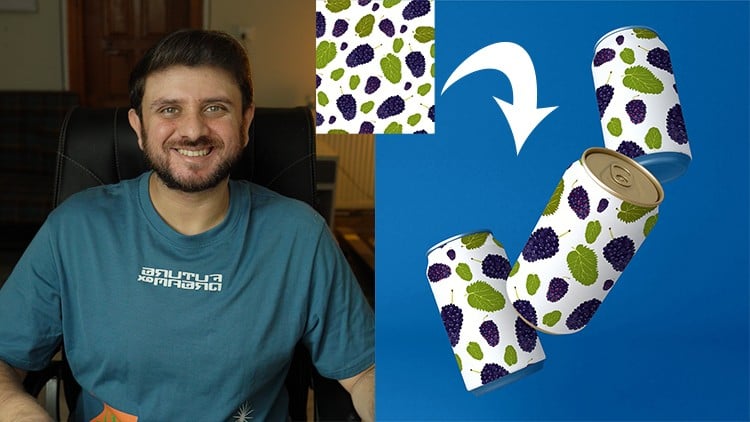
Learn to create stunning, realistic mock-ups in Photoshop with ease.
⏱️ Length: 1.4 total hours
⭐ 4.44/5 rating
👥 12,419 students
🔄 March 2025 update
Add-On Information:
“`html
Note➛ Make sure your 𝐔𝐝𝐞𝐦𝐲 cart has only this course you're going to enroll it now, Remove all other courses from the 𝐔𝐝𝐞𝐦𝐲 cart before Enrolling!
- Course Overview
- This ‘Ultimate Photoshop Mock-Up Creation Course’ empowers you to effortlessly transform static designs into stunningly realistic product visualizations.
- Master the art of crafting professional-grade mock-ups for diverse applications, from branding and packaging to digital interfaces and apparel, showcasing your work with unmatched authenticity.
- Designed specifically for creatives, marketers, and entrepreneurs, this course reveals essential techniques to elevate your presentations, captivate clients, and significantly enhance the perceived value of your design concepts.
- Go beyond basic placements; you will learn to integrate designs seamlessly, paying meticulous attention to the subtle nuances of light, shadow, and texture for truly convincing results.
- Unlock efficient, non-destructive workflows that will streamline your entire design process, allowing for quick iterations, easy modifications, and flawless final outputs.
- Acquire the comprehensive skills needed to create compelling visual stories that effectively bridge the gap between abstract concept and a tangible, high-impact reality for any project.
- Requirements / Prerequisites
- Familiarity with Adobe Photoshop’s basic interface and layer management.
- Access to an installed version of Adobe Photoshop (CC recommended for optimal experience).
- A desktop or laptop computer with a stable internet connection for course access.
- An eagerness to learn advanced design presentation techniques and enhance the professionalism of your creative output.
- Skills Covered / Tools Used
- Smart Objects Mastery: Implement non-destructive editing as the cornerstone for flexible, easily updatable mock-ups, ensuring your designs can be modified instantly without compromising quality or requiring manual re-work.
- Advanced Transformation & Perspective: Learn to accurately warp and distort designs using Photoshop’s powerful tools to conform realistically to complex product angles, curves, and surfaces, achieving perfect visual integration.
- Precise Masking Techniques: Utilize various layer and clipping masks for seamless integration of your designs into mock-up templates, handling even intricate object shapes and difficult edges with professional precision.
- Dynamic Blending Modes: Understand and effectively employ different blending modes to achieve realistic interactions of light, shadow, color, and texture within your mock-ups, making your design appear genuinely part of the product.
- Realistic Shadow & Highlight Creation: Develop techniques for generating convincing shadows and highlights that precisely match the mock-up’s lighting environment, significantly adding depth, dimension, and realism.
- Material & Texture Application: Explore methods for integrating realistic textures such as fabric weaves, paper grains, or metallic sheens to enhance the tactile feel and visual authenticity of your mock-ups.
- Strategic Adjustment Layers: Master the use of adjustment layers for fine-tuning colors, contrast, brightness, and overall mood, ensuring your final mock-up is visually balanced, impactful, and ready for presentation.
- Essential Photoshop Tools: Gain practical command over crucial tools like the Pen Tool for precise selections, Free Transform for object manipulation, and various selection tools for efficiency in your mock-up creation workflow.
- Benefits / Outcomes
- Enhanced Professional Portfolio: Create a visually impactful portfolio with designs showcased in stunning, lifelike contexts, attracting more opportunities and elevating your professional standing.
- Improved Client Engagement: Present design concepts tangibly and convincingly, leading to clearer communication, faster approvals, and significantly higher client satisfaction.
- Streamlined Workflow: Adopt efficient, non-destructive methods that drastically reduce the production time required for creating and presenting design mock-ups.
- Versatile Mock-Up Creation: Develop skills applicable across diverse industries and product types, from apparel and packaging to web UI/UX, print media, and beyond.
- Confident Design Pitches: Equip yourself with the ability to confidently pitch your ideas, knowing you can back them up with highly realistic and compelling visual aids.
- Creative Independence: Eliminate reliance on expensive external services or stock mock-ups by mastering the in-house creation of high-quality, customized product visuals.
- PROS
- Quick Skill Acquisition: A concise 1.4-hour course designed for rapid, high-impact learning, ideal for busy professionals seeking immediate skill enhancement.
- Highly Rated & Popular: Boasts an impressive 4.44/5 rating from over 12,000 satisfied students, indicating proven quality and effective instruction.
- Up-to-Date Content: Recently updated in March 2025, ensuring all techniques and tools are contemporary and aligned with current Photoshop versions and industry best practices.
- Practical & Actionable: Focuses on a hands-on, project-based approach, empowering learners to immediately create stunning, professional mock-ups.
- Boosts Professional Standing: Directly contributes to building a more impressive design portfolio and fostering stronger, more confident client relations through superior presentations.
- Accessible Learning Curve: Designed to be approachable for those with basic Photoshop knowledge, making advanced mock-up creation attainable.
- CONS
- Requires an active subscription to Adobe Photoshop for software access, which is an additional cost beyond the course enrollment.
“`
Learning Tracks: English,Design,Graphic Design & Illustration