From Basics to Pro Design
Why take this course?
🎉 Mastering SOLIDWORKS (2024-25): A Complete Course 🎓
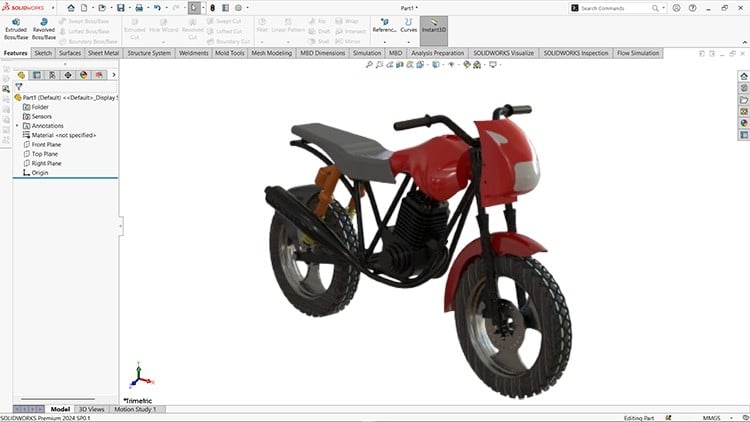
Course Headline: 🚀 From Basics to Pro Design with SOLIDWORKS Mastery: Design, Assemble, and Draft a Complete Bike 🚀
Course Description:
Unlock the full potential of SOLIDWORKS with our meticulously crafted online course that takes you from the fundamentals to becoming an expert in design, assembly, and drafting. Whether you’re a student, professional, or simply a hobbyist with a passion for mechanical design, this comprehensive learning journey will guide you through every step of designing bike parts, assembling them into a functional prototype, and creating detailed drawings for manufacturing purposes.
What You’ll Learn:
- Sketching: 📐 Master the sketching tools in SOLIDWORKS to create precise 2D profiles, understand dimensioning, and learn to apply constraints that will control your geometry.
- Part Design: 🛣️ Discover how to design intricate bike components from frames to gears using SOLIDWORKS’ powerful tools for part creation.
- Surfacing: 🌍 Explore the art of 3D modeling with Surfacing tools, creating complex shapes and forms that define modern bike designs.
- Assembly: 🎠 Learn advanced techniques to assemble your intricately designed bike components using SOLIDWORKS Assembly features for a seamless integration of parts.
- Drafting: 📑 Produce professional-grade 2D drawings with precise dimensions and annotations, essential for manufacturing processes.
- Industry Techniques: 🏭 Pick up best practices for model management, efficient modeling, and gain insights into real-world applications of SOLIDWORKS.
Course Highlights:
- Hands-on Projects: Apply your knowledge with real-world bike design examples that will bring your designs to life.
- Tailored Lessons: Enjoy clear, concise lessons designed for learners of all skill levels, from novice to expert.
- Practical Exercises: Reinforce your learning through practical exercises that solidify your understanding of SOLIDWORKS’ capabilities.
- Access to Resources: Gain access to all project files and resources to support your learning at every step.
Who Should Enroll:
- Engineers and designers eager to elevate their CAD skills and expertise with SOLIDWORKS.
- Students preparing for academic or professional projects who want to get ahead of the curve.
- Hobbyists with a passion for mechanical design, looking to tap into the world of advanced 3D modeling.
Embark on your journey towards SolidWorks mastery today! By completing this course, you’ll not only gain invaluable skills but also the confidence to bring your innovative designs to fruition—whether for professional or personal projects. 🎓✨
Don’t wait! Enroll now and transform your ideas into stunning, functional realities with SOLIDWORKS. Let’s design, assemble, draft, and inspire together! 🚀🛠️🚴♂️
- Navigating the SOLIDWORKS 2024-25 Interface: Gain immediate familiarity with the latest user interface, customize your workspace, and understand fundamental navigation and display options to kickstart your design journey.
- Mastering 2D Sketching & Design Intent: Develop robust and fully constrained 2D sketches using a comprehensive array of geometric tools, dimensions, and relations, ensuring your designs are parametric and adaptable to changes.
- Essential 3D Part Modeling Techniques: Create complex 3D solid models using core features such as extrudes, revolves, sweeps, lofts, fillets, chamfers, and shell commands, focusing on efficient and stable model construction.
- Advanced Part Design & Multi-Body Methods: Dive into sophisticated part modeling including multi-body techniques, configurations, design tables, and advanced patterns to efficiently manage design variations and complex geometries.
- Professional Assembly Creation & Management: Learn to build intricate assemblies, apply various mate types for proper component positioning, detect interferences, and create exploded views for clear presentation and documentation.
- Generating Engineering Drawings & Detailing: Produce industry-standard 2D engineering drawings from your 3D models, incorporating orthographic, isometric, section, and detail views, along with precise dimensioning and annotations.
- Comprehensive Sheet Metal Design: Explore the specialized tools for sheet metal design, including base flanges, edge flanges, hems, jogs, and cuts, with a strong emphasis on bend allowances and flattening for manufacturing.
- Weldments & Structural Frame Design: Master the creation of structural frameworks using SOLIDWORKS Weldments, applying standard profiles, effectively trimming members, and generating essential cut lists for fabrication.
- Introduction to Surface Modeling: Begin your exploration into surface design, learning fundamental techniques to create organic shapes and complex aesthetic forms, understanding the difference and interaction between solids and surfaces.
- Foundations of SOLIDWORKS Simulation: Get an introductory overview of structural analysis (FEA) within SOLIDWORKS, conducting basic static studies to evaluate part performance under various load conditions and constraints.
- Effective Design for Manufacturing (DFM): Learn principles and practices for creating models that are easy and cost-effective to manufacture, considering material properties, tolerances, and production processes.
- Collaborative Workflows & File Management: Understand best practices for file organization, managing external references, and an introduction to collaborative design tools to streamline team projects.
- Real-World Project Application & Portfolio Development: Apply all learned skills through practical, guided projects simulating industry scenarios, culminating in a strong portfolio showcasing your proficiency in SOLIDWORKS 2024-25.
PROS:
- Comprehensive Skill Development: Progress from foundational principles to advanced techniques, ensuring a holistic understanding of SOLIDWORKS for diverse industrial applications.
- Industry-Relevant Curriculum: Focus on practical workflows and design methodologies used in professional engineering environments, directly preparing you for real-world design challenges.
- Portfolio Building Opportunities: Engage with hands-on, guided projects specifically designed to help you create a robust portfolio, demonstrating your design capabilities to potential employers.
- Up-to-Date Content (2024-25): Learn on the latest version of SOLIDWORKS, ensuring your skills are current and relevant with contemporary software features and best practices.
CONS:
- Significant Time Commitment Required: The extensive and in-depth nature of this course demands consistent dedication and substantial practice hours to fully internalize and master all the complex concepts and tools covered.