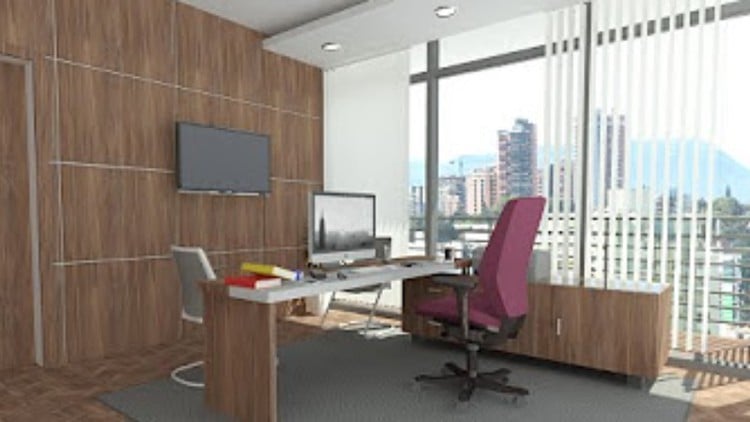
Follow Complete Step by Step instructions to become from Beginner to Pro Level in Modeling & Rendering Interior Office
⏱️ Length: 6.7 total hours
⭐ 4.23/5 rating
👥 14,994 students
🔄 January 2025 update
Add-On Information:
Note➛ Make sure your 𝐔𝐝𝐞𝐦𝐲 cart has only this course you're going to enroll it now, Remove all other courses from the 𝐔𝐝𝐞𝐦𝐲 cart before Enrolling!
-
Course Overview
- This course offers an intensive, project-centric pathway to mastering Autodesk Revit, specifically tailored for interior office design and visualization. It’s meticulously designed to bridge the gap from beginner to proficient professional, guiding you through every critical step of a real-world project lifecycle. You will immerse yourself in a practical, hands-on experience, constructing a detailed interior office environment, focusing on precision modeling and compelling visual output. The curriculum emphasizes ‘learning by doing,’ ensuring theoretical concepts are immediately applied, solidified by a comprehensive step-by-step approach. This practical immersion equips learners not just with software knowledge, but with an understanding of integrated design workflows essential for producing high-quality architectural presentations. By the end, you’ll possess a holistic understanding of how to leverage Revit for creating professional-grade interior architectural projects, ready to impress clients and contribute effectively to design teams.
-
Requirements / Prerequisites
- Basic Computer Literacy: Familiarity with general computer operation, file management, and software navigation is assumed. No prior CAD or BIM software experience is necessary, as the course caters to beginners.
- Access to Autodesk Revit Software: A student license or full version of Autodesk Revit (2023 or newer recommended for full compatibility with January 2025 updates) is required for hands-on practice. The course itself does not provide the software.
- Reliable Internet Connection: Essential for streaming course content, downloading project files, and accessing supplementary resources.
- Adequate Hardware: A computer with a modern processor (e.g., Intel i5/AMD Ryzen 5 or better), at least 8GB of RAM (16GB recommended for rendering), and a dedicated graphics card (highly recommended for optimal performance and rendering tasks) to run Revit efficiently.
- Commitment to Practice: The project-based nature of this course necessitates active participation and consistent practice to internalize concepts and techniques taught.
-
Skills Covered / Tools Used
- Project Initialization & Setup: Mastering project configuration, unit settings, and coordinate systems for accurate model development within Revit.
- Efficient Spatial Planning: Implementing design principles for effective interior space organization, functionality, and aesthetic layout.
- Realistic Material & Texture Mapping: Assigning and customizing materials to surfaces, applying texture mapping for compelling visual realism within models.
- Advanced Lighting & Scene Composition: Configuring natural and artificial light sources, optimizing lighting schemes to enhance mood, clarity, and visual impact for rendered scenes.
- Revit User Interface Navigation: Becoming adept at utilizing Revit’s extensive tool palette, properties browser, and project browser for efficient element management.
- Project Data Management: Understanding how to maintain a well-structured project file, including basic annotation techniques to convey design intent effectively.
- Professional Presentation Workflow: Developing a streamlined process for taking a completed model through to final visual presentation, including setting up sheets and organizing views.
- Photorealistic Output Optimization: Learning strategies to optimize rendering settings for both speed and quality, ensuring professional-grade images suitable for client delivery.
-
Benefits / Outcomes
- Enhanced Professional Portfolio: You will complete a tangible, high-quality interior office project for immediate addition to your portfolio, showcasing your Revit proficiency.
- Industry-Ready BIM Skills: Acquire practical, in-demand Building Information Modeling (BIM) skills valued in architecture, interior design, and construction, boosting your career competitiveness.
- Efficient Design Workflow Mastery: Develop a systematic and efficient approach to managing Revit projects, reducing design time and minimizing errors.
- Superior Visualization Capabilities: Gain the ability to translate complex design ideas into clear, compelling, and photorealistic visuals, significantly improving stakeholder communication.
- Increased Revit Confidence: Transition from uncertainty to confident manipulation of Revit’s powerful features, enabling independent and creative project tackling.
- Real-World Project Insight: Develop an intuitive understanding of Revit’s application in actual architectural and interior design projects, from conceptualization to final presentation.
- Strong Foundation for Growth: Establish a robust understanding of Revit principles, paving the way for further specialization in advanced modeling, documentation, or analysis.
-
PROS
- Project-Based Learning: The hands-on ‘learn by doing’ approach with a real interior office project accelerates skill acquisition and provides immediate practical application.
- Beginner-Friendly: Structured to guide complete novices through every step, ensuring accessibility without prior Revit experience.
- Comprehensive Skill Set: Covers a broad range of essential Revit functionalities from modeling to high-quality rendering within a focused context.
- Up-to-Date Content: The January 2025 update ensures you are learning with the latest features and best practices in Revit.
- Strong Student Community: A large student base (14,994+) often indicates a supportive learning environment and a well-regarded course.
- Practical & Implementable: Skills learned are directly transferable to professional projects, making graduates job-ready for entry-level BIM roles.
-
CONS
- Time Constraint for Depth: While comprehensive for its focus, the 6.7-hour duration might limit exhaustive exploration of every minute Revit feature or advanced theoretical concept, potentially requiring supplementary self-study for niche areas.
Learning Tracks: Hindi,Design,Architectural Design