A Complete course for beginners an advance Professional Level
⏱️ Length: 4.8 total hours
⭐ 4.79/5 rating
👥 1,809 students
🔄 November 2023 update
Add-On Information:
Note➛ Make sure your 𝐔𝐝𝐞𝐦𝐲 cart has only this course you're going to enroll it now, Remove all other courses from the 𝐔𝐝𝐞𝐦𝐲 cart before Enrolling!
- Course Overview
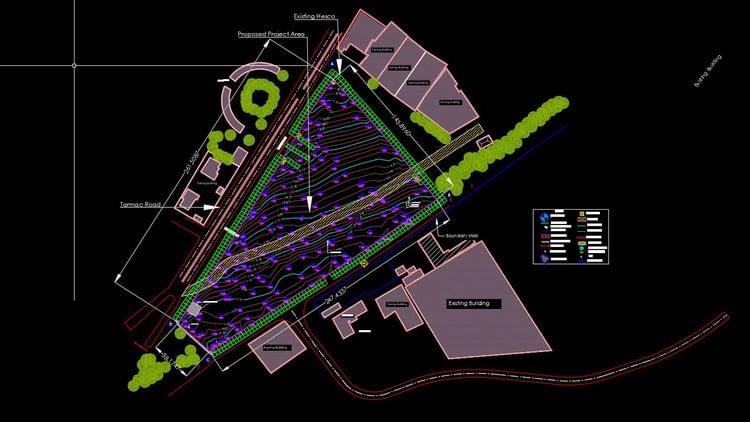
- This comprehensive course is your gateway to mastering the intricate world of land survey data processing within AutoCAD Civil 3D. Designed for both aspiring beginners and seasoned professionals, it meticulously guides you through the entire workflow, transforming raw field observations into precise, publishable topographic and boundary drawings. You will discover how Civil 3D acts as a powerful hub for survey data, enabling automation, ensuring accuracy, and dramatically enhancing project efficiency from the initial survey input to the final detailed output.
- Delve into the core methodologies that empower land surveyors and civil engineers to manage, analyze, and present crucial terrain and property information. The curriculum emphasizes a practical, project-based approach, ensuring that every concept learned is immediately applicable to real-world challenges. With a focus on intelligent survey database management and the revolutionary “Field to Finish” capabilities, you’ll learn to streamline repetitive tasks, minimize errors, and deliver high-quality deliverables consistently.
- Explore the seamless integration of survey points, figures, and surfaces, understanding how they collectively form the bedrock of any successful civil infrastructure or land development project. This course is an investment in your professional growth, equipping you with the vital skills needed to confidently tackle complex survey data, leverage industry-standard software to its fullest potential, and contribute effectively to modern engineering and surveying practices.
- Benefit from an updated curriculum (November 2023) and a highly-rated learning experience, reflecting its value and effectiveness for over 1,800 students. This program is engineered to build a robust foundation in survey data management, surface modeling, and the precise visualization of land information, making you a proficient user of Civil 3D’s powerful survey tools.
- Requirements / Prerequisites
- Basic Computer Literacy: Fundamental understanding of operating a computer and navigating file systems.
- Windows Operating System: Familiarity with the Windows environment as AutoCAD Civil 3D primarily runs on it.
- Access to AutoCAD Civil 3D Software: An installed version of AutoCAD Civil 3D (preferably 2018 or newer) is essential for hands-on practice.
- No Prior Civil 3D Survey Module Experience: The course is structured to accommodate learners with no previous exposure to Civil 3D’s survey functionalities.
- Willingness to Learn: A strong desire to acquire and apply new technical skills in surveying and design software.
- Skills Covered / Tools Used
- Skills Covered:
- Advanced Survey Data Management: Develop expertise in organizing, querying, and maintaining comprehensive survey databases, ensuring data integrity and accessibility for all project stakeholders.
- Automated Drawing Production: Master the art of converting raw field data into intelligent linework and graphic representations with minimal manual intervention, significantly boosting drafting speed.
- Precision Terrain Modeling: Acquire the ability to generate highly accurate and detailed Digital Terrain Models (DTMs) and Triangulated Irregular Networks (TINs) from various survey inputs, essential for design and analysis.
- Survey Network Analysis & Adjustment: Learn techniques for analyzing and balancing traverse networks to achieve closure precision, a critical skill for boundary and control surveys.
- Dynamic Land Parcel Creation: Understand the principles and application of defining and managing land parcels, including lot line adjustments and automated area calculations within the software environment.
- Efficient Data Visualization: Develop skills in presenting complex survey information clearly and effectively through custom styles, labels, and plot outputs, making data understandable to diverse audiences.
- Workflow Optimization: Implement best practices for setting up project standards, utilizing templates, and applying productivity hacks to streamline survey drafting and design processes.
- Interpreting Field Codes: Gain a deeper understanding of how field coding conventions directly translate into automated graphical elements and features within Civil 3D.
- Tools Used:
- AutoCAD Civil 3D Survey Tab & Module: The primary interface for all survey-related operations.
- Survey Database Manager: For creating, managing, and editing survey databases and their components.
- Figure & Observation Editors: Tools for reviewing and modifying survey figures and individual observations.
- Surface Creation Wizards & Tools: To generate and refine TIN surfaces from points, figures, and breaklines.
- Traverse Editor & Adjustment Tools: Dedicated functionalities for inputting, adjusting, and balancing survey traverses.
- Points & Point Groups: For managing and categorizing survey points.
- Parcel Creation & Layout Tools: For defining, editing, and labeling property boundaries.
- Command Line & Dynamic Input: For efficient interaction and execution of Civil 3D commands.
- Skills Covered:
- Benefits / Outcomes
- Professional Competence: Emerge as a highly capable professional in processing, analyzing, and presenting survey data using industry-leading software.
- Enhanced Productivity: Drastically reduce the time spent on manual drafting and data manipulation, freeing up resources for more analytical tasks.
- Improved Data Accuracy: Minimize errors and ensure consistent, reliable survey outputs through automated workflows and rigorous data validation.
- Career Advancement: Open doors to new opportunities in land surveying firms, civil engineering companies, government agencies, and construction sectors.
- Robust Project Deliverables: Produce high-quality, professional-grade topographic maps, boundary plans, and site models that meet professional standards.
- Foundation for Advanced Design: Establish a solid understanding of survey data that serves as a crucial prerequisite for subsequent civil design tasks within AutoCAD Civil 3D.
- Confidence in Complex Projects: Gain the assurance to tackle challenging survey data sets and integrate them seamlessly into larger project contexts.
- PROS
- Highly Practical Skill Development: Focuses on real-world applications and job-relevant techniques, making you immediately productive.
- Up-to-Date Content: Features a November 2023 update, ensuring you learn with the latest software functionalities and best practices.
- Beginner-Friendly to Advanced: Caters to a broad audience, allowing new users to grasp fundamentals and experienced users to refine advanced techniques.
- Efficiency-Focused: Teaches methods to significantly reduce manual work and increase output speed in survey drafting.
- Positive Student Feedback: A 4.79/5 rating from over 1,800 students underscores the course’s quality and effectiveness.
- Concise Learning Time: Delivers comprehensive knowledge in a manageable 4.8 total hours, ideal for busy schedules.
- CONS
- Software Licensing: Requires a licensed version of AutoCAD Civil 3D, which might be an additional expense for some users.
Learning Tracks: English,Teaching & Academics,Engineering